Soviet Inveders: writing a PDP-11 Arcade Game for the Elektronika MK-90
Soviet Inveders is a small arcade game I wrote for the Elektronika MK-90, the remarkable Soviet handheld computer built around a PDP-11-compatible architecture. What started as an experiment by simply putting a moving sprite on the MK-90 LCD gradually became a complete ten-level game with sound, scoring, lives, multiple enemy types, a final boss, a splash screen, keyboard repeat, and a framebuffer renderer designed specifically around the limitations of the real machine.
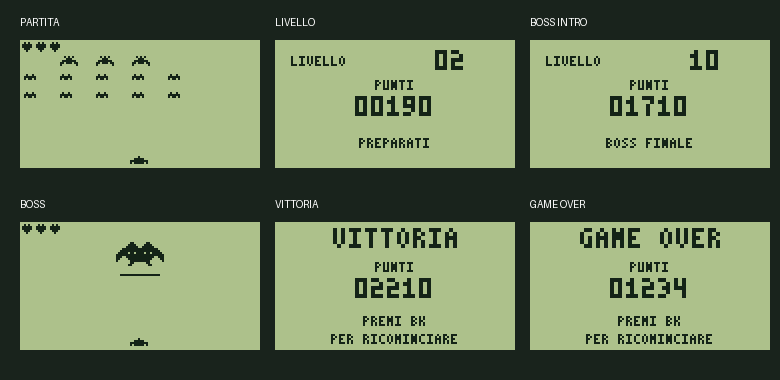
The version described here is v0.16. Most importantly, this is no longer only a simulator experiment: I programmed the ROM and tested this exact version on my physical Elektronika MK-90, where it runs correctly.
Why write a game for the MK-90?
The MK-90 is interesting because it is very different from the small home computers that normally receive new retro games. Internally it follows the PDP-11 programming model, while the user interface is a compact monochrome LCD, a calculator-style keyboard, a real-time clock, and a small serial peripheral subsystem. There is no convenient modern graphics API, no operating system game library and, of course, no hardware sprite engine.
That makes it a perfect machine for this kind of project. Everything visible on the screen has to be produced by code that understands the LCD memory layout. Keyboard handling has to cooperate with the original peripheral controller. Timing comes from the RTC. Even the sound is generated by exploiting the serial clock hardware.
The goal was not to emulate a more powerful computer inside the MK-90. I wanted the game to feel as if it had been written specifically for this machine, using its own hardware directly.
The ROM layout
The distribution image is intended for a 27C256 EPROM. soviet_inveders_v0.16_27c256 The complete EPROM image is 32 KiB, but the game uses only the first 8 KiB bank. The remaining bytes are filled with FF.
A small loader occupies 438 bytes. It loads the game payload into RAM starting at address 0x0800 and verifies the payload before execution. The complete v0.16 game payload, including its checksum word, is only 7,236 bytes. In other words, the loader and the complete game still fit inside the first 8 KiB bank.
No copy of the original MK-90 BASIC ROM is included in the game image.
27C256 EPROM
+-------------------------------+
| Bank 0 - loader + game        | 8 KiB
+-------------------------------+
| unused / FF                   |
+-------------------------------+
| unused / FF                   |
+-------------------------------+
| unused / FF                   |
+-------------------------------+

Game payload in RAM: 0x0800 ... 0x2443
Payload size:        7236 bytes
A 120 x 64 monochrome framebuffer
The MK-90 LCD is 120 x 64 pixels, but the memory arrangement is not a conventional linear bitmap. The two 32-line halves of the display are interleaved in memory, so drawing a pixel requires calculating both the horizontal byte and the correct LCD page.
The game therefore uses three important framebuffer areas:
0x0200– the visible 960-byte LCD framebuffer;0x2800– an invisible 960-byte composition framebuffer;0x2C00– a cached 960-byte alien layer.
Early versions could simply redraw everything, but that approach wastes CPU time and makes unwanted visual effects much more likely. Version 0.16 uses a more deliberate renderer. Static enemy graphics are kept in a cached layer. Dynamic objects such as the player, bullets and life hearts are then composed over it. Finally, only bytes that have actually changed are copied to the visible framebuffer.
Two 32-byte dirty-row maps track the current and previous modified rows. This is especially important on a slow, unusual display: the LCD never has to see a deliberately cleared intermediate frame. The new frame is built off-screen and only the differences are published.
Sprites without a sprite engine
All game graphics are software sprites. To avoid expensive per-pixel shifting during the game, each sprite is stored in eight pre-shifted forms, one for each possible bit alignment inside an LCD byte.
The main sprite set contains:
- a 9 x 5 large alien;
- a 6 x 3 small alien;
- a 9-pixel-wide player ship;
- a 5 x 5 heart used as the life indicator;
- a 24 x 12 final boss, divided into three 8-pixel tiles.
The sprite routine ORs two interleaved framebuffer bytes per row and marks the touched LCD rows as dirty. This is substantially faster than drawing every set pixel individually.
Ten levels and a final boss
Levels 1 through 9 use a formation of fifteen possible enemy positions. The upper row contains three large enemies, while the two lower rows contain ten small enemies.
| Enemy | Size | Hits | Score |
|---|---|---|---|
| Small alien | 6 x 3 pixels | 1 | 10 points |
| Large alien | 9 x 5 pixels | 2 | 30 points |
| Final boss | 24 x 12 pixels | 20 | 500 points |
The three large aliens have armour. The first hit removes the armour but does not award points; the second destroys the enemy. Small aliens die with one hit.
The movement rate increases gradually with the level. At level 1 the formation moves once every 16 simulation ticks. By level 9 that delay has fallen to 8 ticks.
Level 10 replaces the complete formation with a 24 x 12 boss. The boss moves horizontally, fires toward the player and has twenty hit points. A small energy bar is drawn below it, one pixel for every remaining hit point. Destroying the boss ends the campaign in victory. There is intentionally no level 11.
A complete game is worth 2,210 points.
Collision detection and fast projectiles
The player projectile moves four pixels per simulation tick. That is fast enough to jump completely over a small alien that is only three pixels high, so the movement is divided into two collision substeps of two pixels each.
For normal enemies, the collision routine maps the projectile position into the 5 x 3 formation grid. From that cell it obtains a one-bit mask identifying the corresponding alien. The same mask is used both in the live-alien bitmap and in the armour bitmap for the large enemies.
The boss uses a simpler 24 x 12 rectangular hit test and a dedicated hit-point counter.
The RTC is the heartbeat of the game
The real-time clock is configured to provide a 32 Hz event source. The RTC interrupt increments the global tick counter, and the main loop advances the simulation one tick at a time.
This gives the game a stable timing reference independent of how much work is required to render a particular frame or play a sound. Splash-screen transitions, the jingle, enemy movement, level delays and keyboard repeat are all derived from the same clock.
The splash sequence uses five reveal stages over the first 48 ticks – 1.5 seconds at 32 Hz – and then holds until tick 80. Instead of storing five complete title images, v0.16 stores one full title bitmap plus five reveal masks. The visible result is the same, but ROM space is saved.
Keyboard handling was one of the hardest parts
The MK-90 keyboard is not a PC-style memory-mapped matrix that can simply be polled whenever the game wants. The program talks to the peripheral interface using the same basic transaction sequence used by the original system software.
The important raw key codes used by the game are:
Left arrow   0x5B
Right arrow  0xBB
Space        0x7F
BK / Enter   0xFB
Keyboard events are placed in a small ring buffer by an interrupt handler. The game loop consumes them independently of rendering.
Held keys required additional work on the real hardware. Every four RTC ticks – eight times per second – the program resets and reinitialises the peripheral controller. A genuinely repeated hardware interrupt then supplies the repeated key event. This avoids inventing key repeats from a stale software latch.
The final control scheme deliberately allows a direction key to mean move and fire. Holding Left or Right therefore moves the ship and repeatedly fires whenever the single player-projectile slot is free. Holding Space fires without moving.
Sound from the serial controller
The MK-90 does not provide the kind of programmable sound generator normally associated with an 8-bit game machine. Soviet Inveders instead uses the clock of the KA1835VG4 serial interface as a square-wave source.
The tone routine selects a serial clock divider and performs repeated transfers for the required duration. Different divider values produce the firing sound, alien-hit sound, player-hit sound, movement tones and the splash jingle.
This also creates an interesting concurrency problem: the keyboard and audio routines share the serial hardware. While audio owns the bus, a keyboard interrupt is acknowledged but deferred. Once the tone has completed and the bus has been restored to its keyboard configuration, the deferred event is serviced safely.
Level banners, game over and victory
Between waves the game displays a two-second status screen containing the current level and score. Before level 10 the banner also announces the final boss.
When all lives are lost, or when the alien formation reaches the lower limit, the game displays GAME OVER. Destroying the boss displays VICTORY. Both screens show the final score and wait specifically for the BK key before starting a new game, preventing Space or a direction key from accidentally restarting the campaign.
The large panels are stored as simple run-length-encoded bitmap streams and decoded directly into the composition framebuffer.
Assembly structure
The final source is pure PDP-11-style code and data. The main entry point starts at 0x0800. Interrupt vectors for the RTC and keyboard are installed during initialisation, after which the game performs its splash sequence and enters the event loop.
A small extract from the beginning of the program looks like this:
start:
        MTPS #0x00E0
        MOV  #0x3FFE, SP
        CLR  @#TICKS
        MOV  #clock_isr, @#RTC_VECTOR_PC
        MOV  #0x00E0, @#RTC_VECTOR_PSW
        MOV  #key_isr, @#KEY_VECTOR_PC
        MOV  #0x00E0, @#KEY_VECTOR_PSW
        ...

main:
        CMP  @#TICKS, @#LAST_TICK
        BNE  game_step
        WAIT
        BR   main
The complete commented source contains the game logic, both interrupt handlers, keyboard code, audio code, collision routines, renderer, score conversion, all sprite variants, decimal glyphs, title data and all compressed panels. The final payload contains 227 symbolic labels.
Building and testing it
During development I used a Python build system containing a small PDP-11 instruction emitter and a CPU model. This made it practical to generate ROM images, run automated campaign tests and compare framebuffer output without repeatedly erasing and programming an EPROM for every small change.
The automated tests exercise all nine normal waves, all twenty boss hits, score progression, level pauses, defeat, victory, restart logic and numerous framebuffer states. They were extremely useful, but the project also demonstrated a familiar lesson in retro-computing: a simulator is not the final authority on hardware behaviour.
The real MK-90 exposed details that a software model could easily tolerate or approximate, especially around peripheral timing and keyboard behaviour. For that reason, the milestone that matters most to me is simple: v0.16 now runs correctly on a real Elektronika MK-90.
What I learned
The most interesting part of this project was not reproducing the basic rules of Space Invaders. It was adapting a game loop to a very unusual handheld computer and learning how much can be achieved with careful use of a small amount of RAM, a monochrome LCD and a few peripheral registers.
Several optimisations were driven directly by the hardware:
- pre-shift sprites instead of shifting graphics during every frame;
- cache the enemy layer instead of rebuilding it unconditionally;
- publish only changed LCD bytes;
- use an RTC interrupt as the global timing source;
- keep keyboard input in a ring buffer;
- share the serial hardware carefully between keyboard and audio;
- store large screens with RLE compression;
- use one splash bitmap with reveal masks instead of five complete images.
The result is a complete arcade game whose game payload remains below 8 KiB while still containing graphics, sound effects, a title sequence, ten levels and a final boss.
I have heavily used AI to acomplish this project, it increased my productivity by a 1000x factor! Awesome.
Soviet Inveders v0.16
Elektronika MK-90 / PDP-11
(C) 2026 Papadopol Lucian-Ioan
l.i.papadopol@gmail.com