MU90 MPO Bridge is a small hardware and software project I developed to connect Elektronika MK-90 removable MPO memory modules to a modern Linux PC.
The bridge is built around a Waveshare RP2350-Zero. The microcontroller talks directly to the serial interface of the MPO module and exposes a USB CDC connection to the computer. On Linux, a companion command-line application called mpoctl provides raw backup/restore operations and, for modules formatted with the MU90 MKS2 filesystem, direct file-level access.
The current release described here is MU90 MPO Bridge 0.2.2. MU90_MPO_Bridge_0.2.2_COMPLETE
Why build an MPO bridge?
The Elektronika MK-90 is a Soviet handheld computer based on a PDP-11-compatible architecture. It uses small removable memory modules which are extremely convenient on the original machine, but not on a modern development workstation.
While developing MU90 Mad Unix 90 and the MBC Mad BASIC Compiler, I wanted a practical way to move files between Linux and the real MK-90 without repeatedly entering source code from the keyboard.
The desired development cycle is simple:
Linux PC
   |
   |  edit / compile
   v
program.bas / program.mbx
   |
   |  mpoctl put
   v
RP2350-Zero USB bridge
   |
   v
MPO module
   |
   v
Elektronika MK-90
The same adapter is also useful for preserving old modules. A complete MPO image can be read into a file, checksummed, archived and later restored.
Waveshare RP2350-Zero
I chose the Waveshare RP2350-Zero because it already provides native USB device support, plenty of GPIO, enough RAM for buffering, and an onboard addressable RGB LED which can be used as a status indicator.
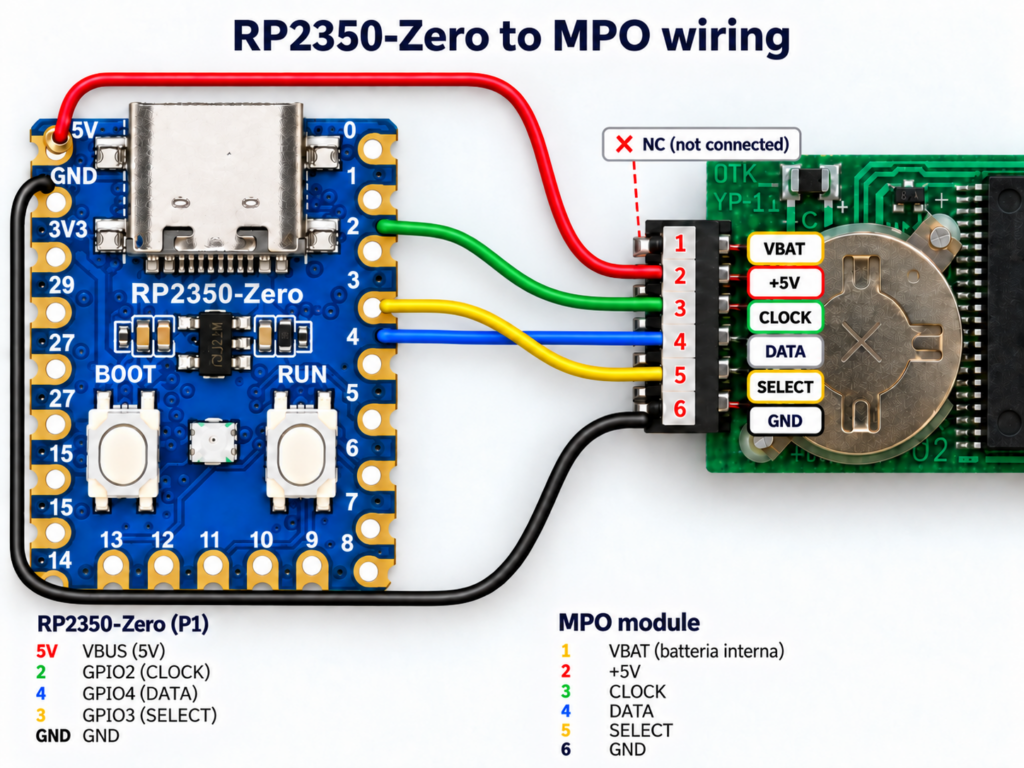
The bridge only needs three signal lines in addition to power and ground:
| RP2350-Zero | MPO pin | Function |
|---|---|---|
| VBUS / 5 V | 2 | +5 V |
| GPIO2 | 3 | CLOCK |
| GPIO4 | 4 | DATA |
| GPIO3 | 5 | SELECT |
| GND | 6 | Ground |
MPO pin 1, the battery terminal, is not used by the current bridge.
Firmware architecture
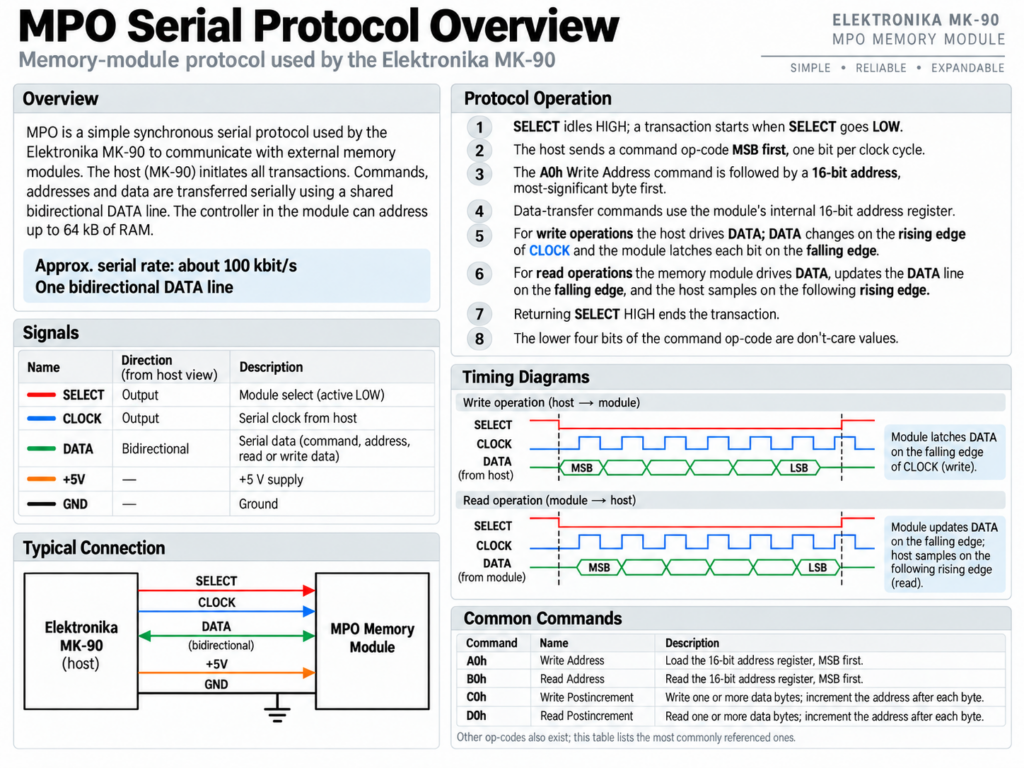
The firmware does not try to understand files or directories. Its job is intentionally smaller: it implements the physical MPO protocol and provides reliable byte-range read and write operations over USB.
This gives the project a clean separation:
MPO module
    |
    | proprietary synchronous serial protocol
    v
RP2350 firmware
    |
    | USB CDC binary protocol + CRC32
    v
mpoctl on Linux
    |
    | raw access or MKS2 filesystem operations
    v
user files
USB protocol
The PC and the RP2350 communicate through a compact binary protocol carried over USB CDC. Each command contains framing information and a CRC32 so corrupted transfers can be detected.
The bridge supports operations such as:
- firmware information;
- MPO bus reset;
- status read;
- raw memory read;
- raw memory write;
- write followed by read-back verification.
The maximum USB transfer block used by the current firmware is 1024 bytes. Larger operations are divided automatically by the Linux utility.
mpoctl: Linux MPO control application
mpoctl is the host-side utility supplied with the project. It is written in C and uses ordinary POSIX serial-device access, so no additional USB library is required.
After connecting the bridge, Linux normally exposes it as a CDC device such as:
/dev/ttyACM0
The first diagnostic command is:
./mpoctl --device /dev/ttyACM0 bridge-info
A working bridge reports information similar to:
transport:        USB CDC bridge
protocol:         1
firmware:         0.2.2
max transfer:     1024 bytes
capabilities:     ...
Making a complete backup before writing anything
For an unknown or valuable module, the first operation should always be a complete raw backup.
For a 10 KiB MPO module:
./mpoctl --device /dev/ttyACM0 raw-read dump1.bin 10
./mpoctl --device /dev/ttyACM0 raw-read dump2.bin 10

sha256sum dump1.bin dump2.bin
cmp dump1.bin dump2.bin
If both SHA-256 values are identical and cmp prints nothing, two independent reads produced exactly the same image.
This was one of the most useful tests during development because it separates physical-bus problems from filesystem problems.
MKS2 filesystem support
MKS2 is the small filesystem used by MU90 on writable MPO modules. The filesystem implementation inside mpoctl is independent from the RP2350 firmware.
The host utility understands:
- the MKS2 superblock;
- two metadata generations;
- checksums;
- copy-on-write metadata updates;
- directories;
- regular files;
- allocation and free-space management;
- file replacement and deletion;
- filesystem verification.
It was not implemented simply by reading the filesystem documentation and hoping the interpretation was correct. I tested interoperability in both directions using the actual MU90 PDP-11 filesystem code inside the CPU model.
The test sequence was:
MU90 PDP-11 code
    -> format MKS2
    -> create files
    -> export MPO image
    -> mpoctl reads and verifies it
and also:
mpoctl
    -> create directory/file
    -> write MPO image
    -> MU90 PDP-11 mounts it
    -> MU90 reads the same file
Both directions passed.
Listing files
Once a module contains MKS2:
./mpoctl --device /dev/ttyACM0 info
./mpoctl --device /dev/ttyACM0 ls /
For example, during the first successful real-hardware test the module contained a directory used for BASIC development:
/pr-basic
    demo.bas
    demo.mbx
    math.bas
    math.mbx
This was especially satisfying because the same files were visible directly from MU90 running on the real Elektronika MK-90.
Copying files from the MPO to Linux
To extract a file:
./mpoctl --device /dev/ttyACM0 get /pr-basic/math.bas
or to choose a different local filename:
./mpoctl --device /dev/ttyACM0 \
    get /pr-basic/math.bas math-backup.bas
Copying files from Linux to the MPO
To write a file:
./mpoctl --device /dev/ttyACM0 \
    put math.mbx /pr-basic/math.mbx
This is the operation that turns the bridge into a practical MU90 development tool. A program can be compiled on the PC and transferred directly to an MPO cartridge for execution on the real machine.
For example:
./mbc math.bas

./mpoctl --device /dev/ttyACM0 \
    put math.mbx /pr-basic/math.mbx
On the MK-90:
cd /mnt/smp1/pr-basic
exec math.mbx
Directories and deletion
The current utility can also manipulate the directory tree:
./mpoctl --device /dev/ttyACM0 mkdir /basic

./mpoctl --device /dev/ttyACM0 \
    put program.bas /basic/program.bas

./mpoctl --device /dev/ttyACM0 ls /basic

./mpoctl --device /dev/ttyACM0 rm /basic/program.bas

./mpoctl --device /dev/ttyACM0 rmdir /basic
Filesystem verification
After writing files, a useful final check is:
./mpoctl --device /dev/ttyACM0 verify
This checks the MKS2 structures and file data rather than merely assuming that a successful USB command means the filesystem is consistent.
Raw restore
A complete previously saved module image can also be restored:
./mpoctl --device /dev/ttyACM0 raw-write backup.bin
The bridge performs read-back verification after writing. Raw restore is intentionally a low-level operation and should only be used with a known-good backup of the correct capacity.
The onboard RGB status LED
The Waveshare RP2350-Zero includes an onboard WS2812 RGB LED. Version 0.2.2 uses it to make the bridge easier to diagnose without constantly watching a terminal.
The current status scheme is:
| Colour | Meaning |
|---|---|
| Purple | Powered, waiting for USB enumeration |
| Blue | USB bridge idle and ready |
| Cyan | MPO read operation |
| Orange | MPO write / verify operation |
| Green | Successful operation |
| Red | Error |
| White | MPO bus reset |
The LED is driven independently from the MPO signal GPIO, so adding visual feedback did not require changing the external wiring.
Development environment
The firmware is a normal Raspberry Pi Pico SDK project. I use Visual Studio Code with the official Raspberry Pi Pico extension and Pico SDK 2.3.x.
The target board is:
waveshare_rp2350_zero
The firmware uses TinyUSB for the USB CDC device and the Pico SDK hardware libraries for GPIO and the onboard WS2812 support.
What the bridge does not do yet
The current release should not be confused with a generic USB flash drive implementation.
Version 0.2.2 provides:
- USB CDC transport;
- raw MPO backup and restore;
- MKS2 filesystem access through
mpoctl; - file and directory manipulation;
- filesystem verification.
It does not currently expose the MPO as a standard USB Mass Storage device mounted directly by Linux, Windows or macOS.
That remains an interesting future step. A possible implementation could present a synthetic FAT volume to the PC while translating changes to MKS2, or MU90 could eventually gain a directly interoperable filesystem. For the moment I prefer the explicit mpoctl approach because it provides much better diagnostics while the hardware and filesystem code are still evolving.
Why this small adapter matters
The bridge changes the practical development experience of the MK-90 considerably.
Without it, developing software on a modern computer and testing it on the original hardware requires awkward manual transfer steps. With the bridge, the workflow becomes much closer to cross-development for a modern embedded target:
edit on Linux
     |
compile with MBC
     |
mpoctl put
     |
MPO module
     |
real MK-90
At the same time, old cartridges can be backed up safely as raw images before any experimentation.
For a machine whose removable storage was designed decades before USB existed, this little RP2350 board becomes a surprisingly effective modern development interface.
MU90 MPO Bridge 0.2.2
Waveshare RP2350-Zero / Elektronika MK-90 MPO interface
All rights reserved 2026 (C) Papadopol Lucian-Ioan
l.i.papadopol@gmail.com
This software is free to use but not to share/modify and/or make profit.